


View a print-friendly version of this guide here (also available in Spanish here).
Oil and gas production stretches across the state of Texas, often in close proximity to or on the property of those who may be negatively impacted and do not benefit financially from production.
While operators are expected to minimize their impacts on surface owners and nearby residents, this is not always the case, and impacted neighbors need to know where to go to make complaints to our regulatory authorities when problems arise. These guides, developed by Commission Shift and the University of Texas School of Law Environmental Clinic, are designed to be a reference to help anyone concerned about nearby activity know where to go and how to file a complaint with the Railroad Commission of Texas (RRC), our state oil and gas agency. Note that oversight of oil and gas is split between the RRC and the Texas Commission for Environmental Quality (TCEQ), and this guide offers an overview on what complaints usually fall within the RRC’s jurisdiction. It provides guidance on what information is helpful to report to the RRC and how to prepare for an inspection. It also offers tips for navigating the RRC’s website.
Sometimes websites or reporting procedures change. Commission Shift will update information online as we become aware of changes. If you have suggestions for improvements to this guide, please email them to commish@commissionshift.org.
This report does not represent the views of The University of Texas School of Law or The University of Texas at Austin. The information provided reflects the research and views of the individual authors only. This report is not legal advice and should not be used as a substitute for the advice of an attorney.
Introduction
The Railroad Commission’s Jurisdiction
How to File a Complaint
Incident Information Checklist for What to Report to the Railroad Commission
Using the RRC’s Website
Checking on Orphaned Wells and Reporting Undocumented Wells
Preparing for an Inspection
After Filing a Complaint and the Inspection Process
In order for the Railroad Commission (RRC), the state oil and gas oversight agency, to address your concern, it must fall within the agency’s authority. When it comes to oil and gas development, the RRC oversees activities related to the exploration and production, pipeline safety, underground injection of produced water or carbon dioxide, and surface disposal of oil and gas waste. The RRC also has authority over other types of mining, underground injection, and pipelines that will not be discussed in this guide.
View a Spanish version of this table here.
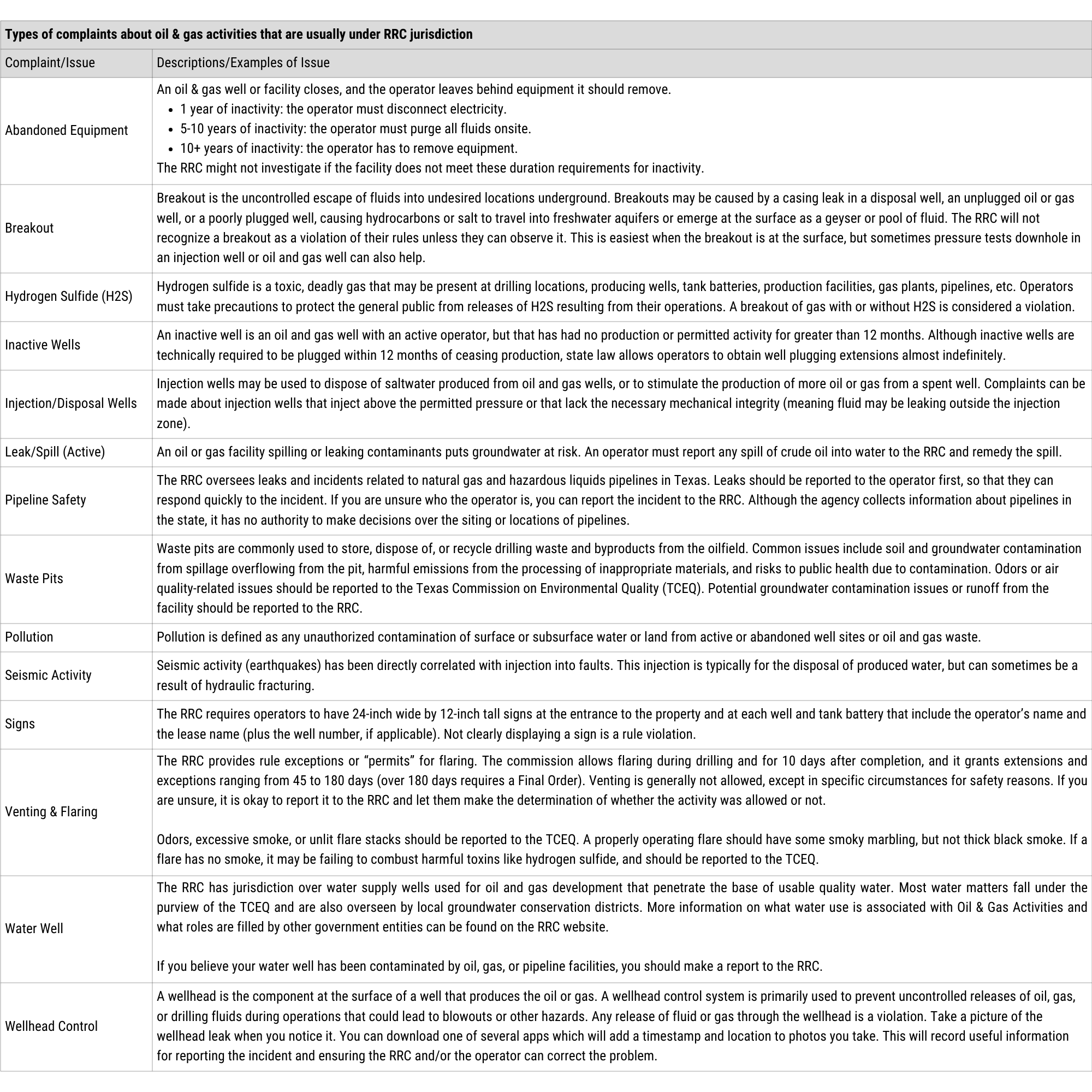
For a more detailed description of how the Railroad Commission and the Texas Commission on Environmental Quality (TCEQ) split jurisdiction over the oil and gas industry, you can read their Memorandum of Understanding, which is codified in Statewide Rule 30.
If you’re unsure whether something falls under the RRC’s authority or not, you may still reach out to the RRC and report the issue. When you ask clear and concise questions, the RRC should be able to tell you if something falls under their jurisdiction or not. If the issue is not within their authority, you can ask which agency does have authority over the issue. Remember to be clear, patient, and persistent throughout this process.
If you aren’t referred to another agency, you may still want to contact one of the other agencies that handles environmental concerns like the TCEQ, which handles issues with air quality, surface water, water wells, and soil contamination that is not related to oil and gas activity — or your local government and law enforcement, which may be able to help with issues related to litter and illegal dumping, noise, and traffic and dust on public roads.
If you observe a leak or issue with an oil and gas well, you should report it to the Railroad Commission (RRC) so that they can investigate. The operator must address any issues with active or inactive wells under their lease. The RRC is responsible for any wells orphaned to the state by delinquent operators.
WARNING: It’s important not to endanger yourself while investigating an issue. If you believe there’s an issue with a well on your property, file your complaint so that an RRC inspector can investigate it, rather than potentially endangering yourself. Toxic gases like hydrogen sulfide can quickly cause death and are not visible or odorous at high concentrations. Collect photos from the safety of a closed vehicle parked a safe distance away and describe the issue as best you can so that an inspector can investigate further.
Refer to After Filing a Complaint & the Inspection Process for more on what happens next.
Our checklist provides a useful tool for gathering information to document for yourself and for use in incident reports or complaints you will file with the Railroad Commission (RRC). You do not need all of this information to make a report, but you should at least be able to provide a description of your concerns and enough information for the RRC to locate the problem. If it is safe, a photo may also be helpful for the investigator.
The Railroad Commission website is full of information, but it may be challenging for the unfamiliar to navigate. This guide is a resource to help navigate the RRC’s website.
TIP: If you find a well or operation near you that you may want information on later, write down the operator number, operator name, API number, lease number, and anything else important to you (e.g., how close the operation is to you, and possible causes of potential pollution ). As you locate this information, remember to save PDFs, screenshots, or printouts of pertinent documents in a folder so you can easily refer back to them later.
DISCLAIMER: RRC applications are subject to updates that may render this information outdated.
Most of the RRC’s search engines/applications are available here. Each system is a tool the RRC utilizes to manage data for different oversight areas or agency functions, whether it is the CASES system to track agency case information, the OIL system to track inspections and violation data at different facilities, LONESTAR that allows operators to file required reports (via different form submissions), or one of the many others listed below.
(usually where you start if you don’t know anything or have access to the property that has the well/operation)
GISViewer: A map of oil wells, waste pits, and other RRC activities.
Online Inspection Lookup (RRC OIL): A tool for looking up inspection and violation records. A user guide and a short video are available here.
**Note that the data sets provided by the RRC’s Online Research Query System are not intended to be used as an authoritative public record and have no legal force or effect.**
Locating the Correct District Office: If you want to make a complaint, request an inspection, or answer questions about inspection or compliance data, call the district office where the well or lease you’re asking about is located. Often, calling the district office allows you to speak with a person closer to the relevant well.
Making a complaint online: The commission likes to receive complaints through their general complaints form to allow them to more efficiently track complaints. You may submit a complaint in writing using the general complaints form.
The following resources can help you locate the appropriate division for your complaint.
Drilling Permits (W-1s): Drilling permit submissions and approvals can be found here.
Data Visualization: Charts and maps by state and county that include drilling permits, production, and clean-up activities can be found here.
Research Queries: A lot of information can be found at the RRC’s “Research Queries” page here.
Note: At least some RRC Queries can also be found in the tab on the left side of the RRC Online Inspection Lookup (OIL) search page.
The RRC sometimes brings enforcement actions against operators or reviews protests against permit applications for newly proposed facilities during “Contested Case Hearings”. Members of the public can attend these hearings, but you must have “party status” to be able to participate in the case. “Party status” can be granted to you if you respond in a timely manner to the operator’s notice of application, and if you will potentially be affected by the proposed facility. If you are involved in a contested case, the information below will allow you to review filings related to the case.
CASES: Select “CASES” from the list of RRC applications. Use the CASES webpage to find information about a past or upcoming case by searching for the Operator Name, Year Filed, Docket Number, and more. The easiest way to find a specific case is by typing in the last four digits of the docket number, if you know it. The “Login” button is for those who submit operator filings. The RRC has a video overview and a user guide to help you navigate the CASES.
Hearings Calendar: The RRC hearings calendar will tell you the name of the companies involved in the case and whether the upcoming hearing is going to be held in person or by Zoom. Hearing files are accessible in the RRC’s Data Management system, Neubus/NeuDocs. The RRC has a guide for how to search oil and gas hearings files in their system here. Each docketed hearing is assigned a code category based on the type of matter being decided (view the list of hearing docket type codes here). This code may be helpful when searching for a specific type of docket. For example, if you only want to look for Show Cause Hearings, you can use the code “SHO” to narrow your search. View a video on how to use Search Imaged Records and Neubus/NeuDocs here.
Data Management System (Neubus/NeuDocs) also contains documents and records for the “Programs” listed here. Select the Program area of interest from the dropdown “Programs” tab on the left to bring up a Key Search of each respective program area database by respective field entry or Full text search.
Documents you can look up include:
If you have trouble with the Imaged Records/Neubus, try calling RRC’s Central Records Research desk at 512-463-6800.
Data Sets: The RRC has many other documents, maps, and datasets available for download, including map files and data tables. These include:
Research and statistics: Summaries of information produced by the RRC are available here.
Categories include:
Open Records Request: If you wish to obtain more information (such as details about a specific incident, permit, lease/well, enforcement action, etc.), you can file an open records request by emailing open.records@rrc.texas.gov . Additional information and guidance can be found here. If you request information that is already publicly available on the website, RRC may ask you to send your request to PublicAssist@rrc.texas.gov. Public Assist will help you locate the information on the website. Alternatively, you may use the commission’s General Information Contact Form to submit your request, and it will be routed to the appropriate section, either Public Assist or Open Records. You can find that form on their Contact Us page.
Records Retention Requirements: Knowing what information the RRC is required to retain and the timeframe they are required to retain it may be helpful in your information search. The agency’s records retention schedule outlines the information retained, which should therefore be available to the public upon request. View the RRC record retention policy here.
Permitting Information: Information on permitting for oil and gas waste management, treatment, or recycling facilities and waste haulers is here.
RRC Rules: Current rules can be found here.
Rulemaking Process & Providing Public Comment/Input: When the Railroad Commission drafts and proposes new rules, it accepts public comments.
Open Meeting Public Input: Open meetings are held every month and can be attended in-person or online, or watched by recordings made available after the meeting. To register to address the Commission at open meetings, you must email rrcconference@rrc.texas.gov or call 512-463-7865. You must register by noon (12:00 p.m.) on the day before the scheduled open meeting. Late registration may result in the loss of your opportunity to participate in the item. Full directions on how to register and provide public input are posted on every agenda.
Public Event Calendar: This is where the RRC posts information about public events it will be attending or hosting. This calendar does not include events related to formal RRC processes, such as hearings.
Public Subscription Services: The RRC maintains several subscriptions lists for news releases, oil & gas news, monthly newsletters, and more.
More info can be found on the RRC’s Resource page. A video tour of the RRC website is available on the RRC’s Resource Center Video subpage. For more information, you can contact the RRC at 512-463-7158 for general inquiries.
If you have an orphaned well on your property and want to find out if it will be plugged in the near future, you can look up its prioritization status on the Railroad Commission (RRC) website. If the well isn’t on the list below, you can also call your district office and ask to talk to the lead plugger.
Go to the State Managed Well Plugging webpage and click “Wells Remaining to be Plugged with State Managed Funds.” This list is updated periodically, and changes as the state plugs wells and new orphaned wells are added. See the RRC’s “Well Plugging Prioritization System” document to learn what the priority codes mean.
If you can’t find a well or it’s not in their system, call your district office to make a formal complaint about the well and tell them as much location information as possible.
In rare instances, very old wells are unknown to the RRC and need to be reported so they are documented and attended to. Undocumented wells could be oil and gas wells, water wells, or other types of mineral development wells.
If you cannot find the well in either database, you may report the well to both agencies. Locate and call your RRC district office and make an official complaint, and state that you’d like to report an unknown oil or gas well.
Follow the instructions on TWDB’s website to report an abandoned water well. To find the instructions, click here and select “How can I report a deteriorated or abandoned water well?” in the “Abandoned Water Wells/Groundwater Contamination” dropdown.
When an inspector comes to review a site due to a complaint, it is helpful to organize your information and prepare questions to make the visit more productive.
Be responsive. Make sure to check your email or voicemail. Contact your district office for an update if you haven’t heard back within one week. If Railroad Commission (RRC) staff contact you and don’t hear back, they may not have the information they need to properly investigate your complaint, and they might close the complaint.
You may hear nothing. It’s possible you won’t hear from the RRC at all. Sometimes inspectors will not contact you unless they have trouble finding the location. Many times, RRC staff are not allowed to consider evidence presented by complainants when issuing a violation. However, the inspector may have some clarifying questions for you.
Use your complaint number. If you made a formal complaint, you should have received a complaint number. You can use this number to search the complaint in the RRC Inspections database.
If an issue falls within the RRC’s jurisdiction, they may schedule an inspection.
The issue might have been one that was resolved without inspection, such as through a records search. For example, if the complaint is about an oil well that is no longer producing, an inspector can review the production records online rather than conducting an on-site inspection. Did you provide sufficient location information in your complaint so that the inspector can locate the issue? Sometimes inspectors need more information to locate the problem.
Contact your district office if you have questions why there was no inspection.
You can look up information about the inspection in the RRC Online Inspection Lookup tool. To find your specific inspection, you can input any of the following: Complaint #, API #, Operator Name or #, Drilling Permit #, Oil and Gas District, County, or Lease Name or #.
You should receive a status letter within 2 weeks or 30 days after the initial inspection. This letter should update you on whether any violations were found, and if so, which enforcement actions will be taken against the operator. If you have not received a status update, please contact your district office to request an update.
If you received a status letter that said no violations were found, and you believe the problem is still occurring, make another complaint or go directly to the operator to try and resolve the issue.
If you received a status letter that said the operator was noncompliant:
If the RRC decides to pursue an Enforcement Action against the operator, you should get a letter notifying you that your case is being referred to the RRC’s Legal Enforcement Section. At that time, your complaint will be “closed,” but Legal Enforcement will proceed with a docketed case number. Any questions/requests for updates you have at this point should be directed at the RRC’s Legal Enforcement Section, who can be reached at 512-463-6762.
You may consider seeking legal counsel if you are directly impacted to ensure your rights are properly represented.